Introduction
Have you ever spent ages making a graphic, only to import it into another software and find out that it is blurry, especially when zoomed in?
If your file is a .png, .jpeg, .bmp, a gif, or similar, you are working with Bitmap (or Raster) graphics - and you just encountered one of the biggest limitations of these formats - they look great from a far, but scale terribly.
Bitmap Graphics
You may be familiar with how most images are stored on a computer - a large array of pixels on a fixed grid, each one a single color:
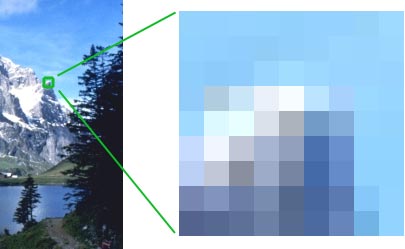
 | If you are wandering about the difference between the different bitmap formats ( .png, .jpeg, .bmp, .gif etc), it all has to do with the way that the pixels are stored in the file. In order to minimize the size of the file, different file types will apply different optimization algorithms. Some file formats prioritize quality, while others prioritize smaller file size. Each file stores the data differently, but they all share the same core concept - that an image is made up of pixels. |
|---|
Bitmap Scaling
The perceived quality of a bitmap image is dependent on the number of pixels that the image is composed of, and the scale of the image on your screen:
| 600px by 300px | 100px by 50px |
|---|---|
 |  |
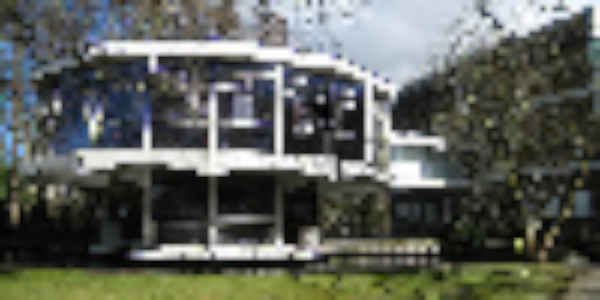
The first image is 600 pixels wide and 300 pixels tall, and looks fine on the screen. Whereas the second image is only 100 pixels wide and 50 pixels tall - smaller by a factor of 6.
If you were not aware of this, your first intuition might be to scale the second image up, but look at what happens if we do:

There is only so much data that an image of that size has, so if you scale it up the computer can only display the pixels that it it has available.
More often that not, programs will blur the pixels instead of enlarging them linearly, to better represent the original image:
Vector Graphics
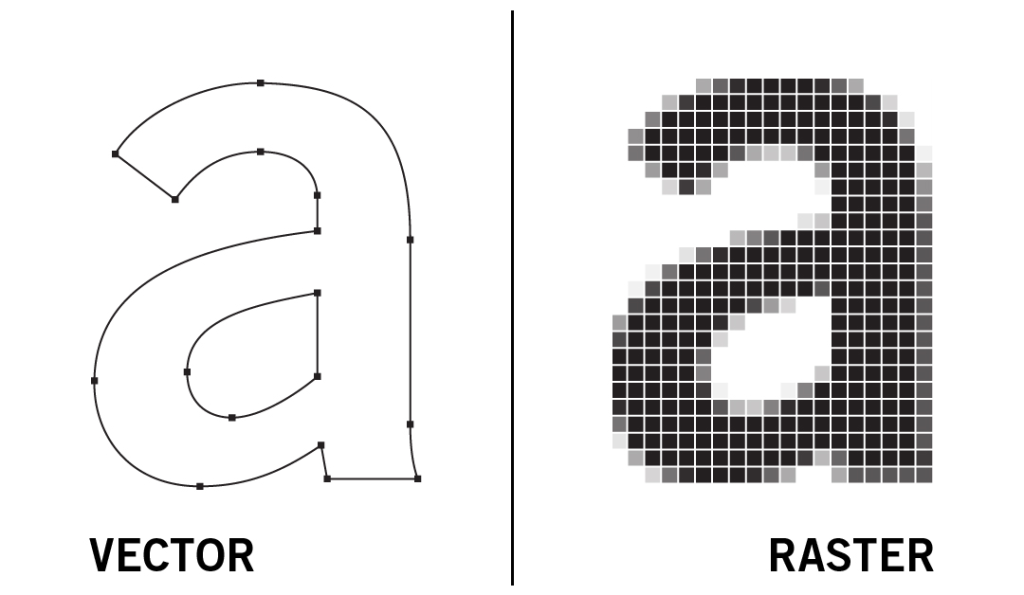
Unlike bitmap, vector images do not use pixels to represent an image. Instead, Vector images are represented through defined geometry (such as lines, curves, polygons, and text). A computer uses these definitions to re-render the image precisely at any scale.
Vector Scaling
As Vector graphics are constantly re-rendered by the computer, we are able to scale them infinitely without blurring or loss of details:
 |  |
|---|---|
| Full Image | Scaled in |
| The computer looks at the curves that are defined, and uses them to render the image at any scale. No matter how far you zoom in, you will not see pixelation. This makes vector graphics the perfect option for icons, logos, and UI elements, as the quality is preserved in any size. |
Bitmap Vs Vector
| Concept | Bitmap | Vector |
|---|---|---|
| Composition | Pixels in a fixed grid | Mathematical paths and shapes |
| Scalability | Loses quality when resized | Infinitely scalable |
| Common Formats | JPG, PNG, BMP, GIF | SVG, AI, EPS, PDF |
| File Size | Large at high resolution (millions of pixels) | Usually small (simple definitions of shapes) |
| Typical Uses | Textures, Photos, Detailed Images | Logos, Icons, UI Elements, Clean graphics |
Roles in different design disciplines
Some examples of where you might find Bitmap and Vector graphics.
| Bitmap | Vector | |
|---|---|---|
| Game Design | Sprites, Backgrounds (Elements you don’t expect to be resized) eg: Character sprites in Celeste, or texture maps in Fortnite | UI, Icons (Elements that resize depending on the screen) eg: UI overlays in Hollow Knight |
| Graphic Design | Editing photos, Digital painting, Scanned materials eg: Magazine covers | Logos, Branding, Simple illustrations, Typography eg: Infographics, branding, packaging design |
| Web Design | Photos, banners, background textures eg: Product photos, marketing visuals Bitmap images must be optimised for different screen sizes | Icons, UI graphics eg: Website logo, buttons, icons, illustrations Automatically adjust to any screen size without quality loss |
| Animation | Textures and backgrounds Can not alter the contents of the image | Motion graphics, Character animation Vector The individual shapes and paths of a vector graphic (such as a character) can be moved around to create animation |
Vector Software
Vector graphics are produced in specialized software such as:
- Adobe Illustrator
- Inkscape
- Affinity Designer
- Blender Blender’s “Grease Pencil” 2D art package uses vector paths and shapes and allows you to create digital art in a vector format