-
Class - A block of code that contains Variables and Functions.
- One class can inherit from another, which means it gets all its variables and functions by default. For example, all scripts you create inherit the ‘MonoBehavior’ class, which contains all the variables and functions needed to make a Unity game script.
-
Variable - A piece of data given a name as a signifier. In C# it is declared, or created, by stating its Data Type and Scope.

-
You do not need to assign a value right away when declaring a variable, but the data type is necessary. If you do not assign the scope it is assumed to be private, but you should do it anyway so it’s clear in your code.
-
Variables don’t have to just be data, they can also refer to certain Game Objects in Unity.
-
-
Data Type - Specifies what type of data a variable is, which decides how it is processed by the engine and what processes are allowed to be performed on it. C# does not have a single data type for “numbers” in general for instance, it gets a bit more specific than that. Common data types in Unity include:
-
String - A string of Unicode characters, like a word or a sentence.
- Example: “hello”, “world”, “hello world”
-
Integer (or Int) - A whole number.
- Example: 1, 28, 200
-
Float - A decimal number. It can store whole numbers too. You usually want to use floats for numbers.
- Example: 3.78, 5.89, 356
-
Double - Like a float, but has room for bigger numbers, or more decimal places for higher precision. Only use it when you need it, float will work in most cases.
- Example: 5.9999999999999
-
Boolean (or Bool) - A value that can only be “true” or “false”.
- Example: true, false
-
Vector2 - A vector made up of two float numbers. Usually describes position or rotation in 2D space, but it has a lot of different use cases.
- Example: (1.3, 2.6)
-
Vector3 - Like Vector2 but with 3 numbers. Usually used for position or rotation in 3D space.
- Example: (1.3, 2.6, 5.2)
-
-
Data Scope - The area of code within which a variable can be used in.
-
Private - Can only be used within the class it is declared in.
-
Public - Can be used by any script. Try to avoid making everything public if you don’t need to, as if any variable can be accessed and edited from anywhere else in your game it can lead to bugs that are very tricky to diagnose. Keeping all scripts as self-contained as possible helps you out in the long run.
-
-
Functions - A collection of code that is given a name as a signifier. When this name is called in your script, or by other scripts, the code will be run. Also known as “methods”.
-
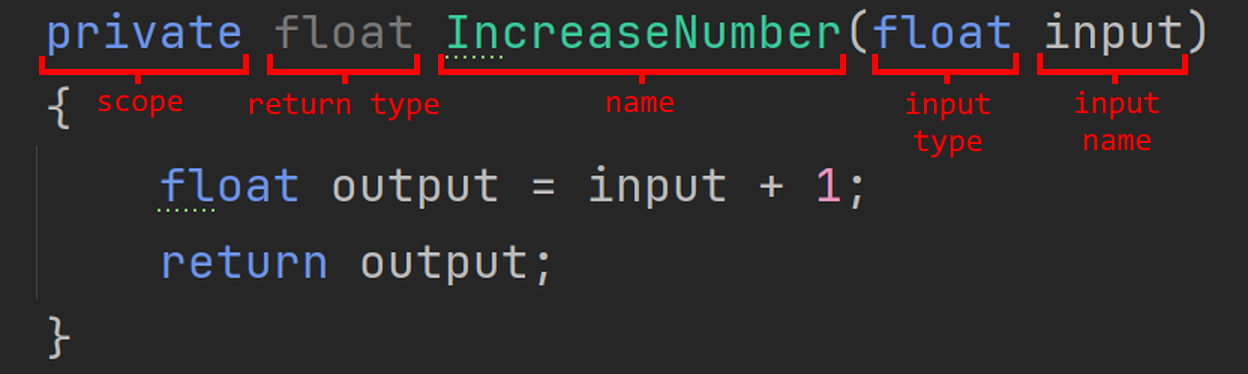
For example, here is a function that returns whatever the input number plus one whenever it is called.
-
-
Functions can optionally take in data as an input. This is stored as a variable inside the function and the name and type of the input is declared when making the function.
-
Functions can also return the value of a variable if need be. The type of the variable is set when the function is declared.
-
Functions also have a scope from which they can be called, just like variables.
-